
An old satellite dish can disrupt reception if it is misaligned, bent, corroded or obstructed by debris. Problems caused by old satellite dishes can also stem from water entering worn cable connections, so a picture that breaks up or disappears may have more than one cause.
It’s easy to blame the weather or television, especially when the signal comes and goes. But visible rust, loose fittings, damaged cables and obstructions around the dish can all offer useful clues.
Learn to spot damage, corrosion, waterlogged cables and debris that may weaken the signal. Then follow simple checks to narrow down the likely cause, see when professional attention is needed and decide what to do with a dish that no longer serves your home.
Key Takeaways
- Compare signal dropouts with visible dish movement or damage to narrow down what may be disrupting reception.
- Look for moisture around cable connections and signs that weathering may be affecting the signal.
- Check brackets, bolts and mounts for corrosion that could weaken the dish’s support.
- Learn which dish damage may call for repair and which signs suggest replacement is the safer option.
- Assess how an unused dish and its fixings could affect roof tiles or allow water to get in.
Dish misalignment, damage and corrosion
- Compare the picture with the dish’s visible position. Wind or an impact can shift a satellite dish, causing pixelation, audio dropouts or lost reception. Trees and buildings can also block its line of sight. In the UK, Sky and Freesat dishes point towards Astra 2 at 28.2 degrees East, so a new obstruction or a changed dish angle can affect the signal.
- Separate signal quality from signal strength. A receiver may show a signal even while the picture breaks up because quality is poor. Alignment involves three planes: east-west direction, elevation and LNB skew. A small movement can matter, so don’t judge alignment by eye alone. Measuring signal quality helps show whether an adjustment improves reception rather than simply changing the receiver’s strength reading.
- Check for visible damage from ground level. Look for a bent reflector, deep dents, a twisted feedarm or rust across the dish surface. A misshapen or heavily rusted reflector may direct signals away from the LNB. A permanently deformed dish, compromised mount or repeated component failures may mean it’s time to replace the dish rather than keep adjusting it.
- Inspect the support as carefully as the reflector. Check whether the bracket looks loose, the dish wobbles in the wind or the feedarm droops. A weakened mount can let the dish move out of alignment and may become a falling hazard. An old dish can fall if its fixings or support fail. Keep people clear of the area beneath an unstable dish, and don’t climb onto a roof to secure it.
- Measure alignment changes safely. Don’t attempt roof-level realignment yourself: a fall, damaged equipment or worse reception can follow. A technician can adjust the dish’s direction and tilt while checking signal quality at the receiver. If the dish and mount are sound, the issue may be localised; checking connectors, the LNB and the mounting can help identify whether adjustment or component replacement is appropriate.
- Inspect and clean from a safe position about every three months, and after heavy storms, snowfall or high winds. Use binoculars from the ground to spot leaves, bird debris or movement. Never lean over a roof edge. Clear loose debris only if it’s safely reachable. For stubborn dirt, corrosion or a dish obstructed at height, leave the work to a professional rather than risk a fall or bend the reflector.
- Review permissions before removing or replacing a dish. Check your tenancy or lease and any property-specific planning conditions, then obtain your landlord’s consent if your agreement requires it. Listed status or local restrictions can affect exterior changes, so don’t assume the same rules apply to every UK property. Problems caused by old satellite dishes are easier to address when you consider the signal fault, physical condition and permission requirements separately.
A misaligned, damaged or obstructed dish can disrupt satellite TV reception, causing pixelation, audio dropouts or loss of signal.
Weatherproofing and waterlogged cables
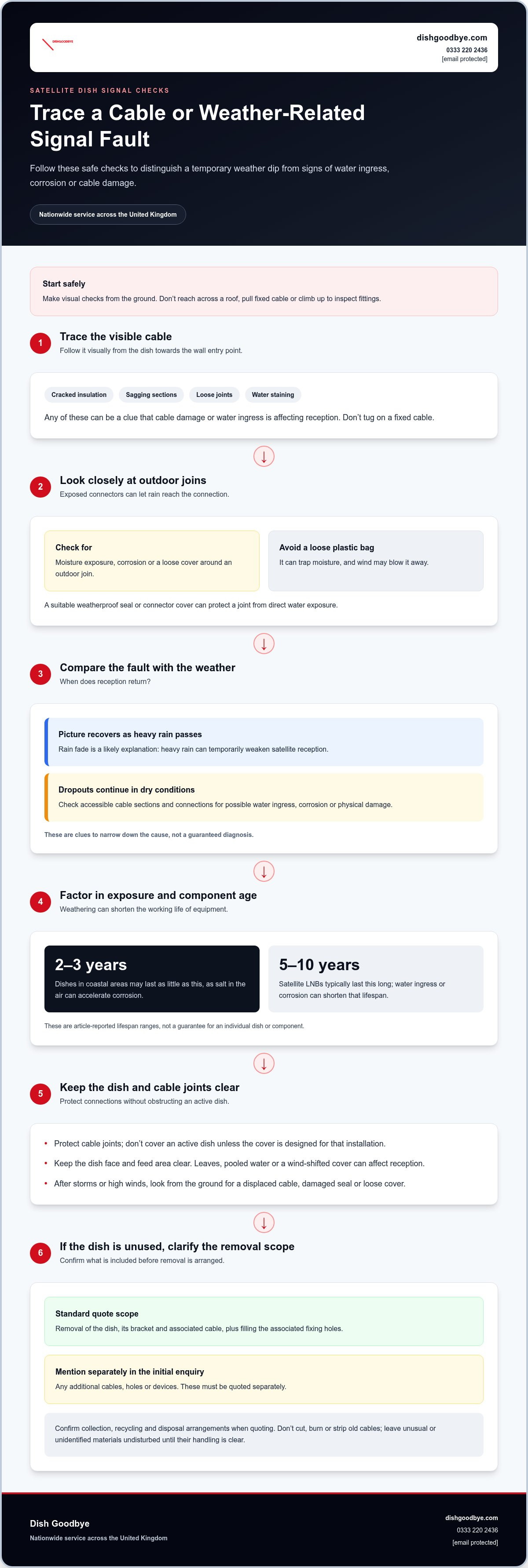
- Visually trace the cable from the dish towards where it enters the wall. Look for cracked insulation, sagging sections, loose joints or water staining around the entry point. Water entering an outdoor connection can weaken reception, while damaged coaxial cable can carry the fault indoors. Stay at ground level. Don’t reach across a roof or pull a fixed cable.
- Check whether outdoor joins are weatherproofed. Rain can seep into an exposed connector, corrode its contact and interrupt the signal. A suitable weatherproof seal or connector cover protects the joint from direct water exposure. Don’t wrap a loose plastic bag around it: moisture can become trapped, and wind can blow the covering away.
- Distinguish rain fade from a cable fault. Heavy rain can temporarily weaken satellite reception, and the picture usually recovers as the weather improves. If reception returns after the shower, rain fade is a likely explanation. If pixelation or dropouts continue in dry conditions, inspect accessible cable sections and connections for water ingress, corrosion or physical damage.
- Account for local exposure. Coastal air contains salt, which can accelerate corrosion and shorten a dish’s working life; dishes in coastal areas may last as little as 2-3 years. After high winds or storms, look from the ground for a displaced cable, damaged seal or loose cover. Don’t climb up to inspect fittings on a chimney or roof.
- Use covers carefully. A cover over an active satellite dish can obstruct the signal, so don’t add one unless it’s designed for that installation. Protect cable joints instead, and keep the dish face and feed area clear. Leaves, pooled water or a cover shifted by wind can affect reception even when the cable looks intact.
- Arrange disposal before removing old equipment. Ask about collection, recycling and disposal arrangements when requesting a quote. Cables and fixings aren’t automatically hazardous because they’re old. Don’t cut, burn or strip them. Leave unusual or unidentified materials undisturbed until you know how they’ll be handled.
- For an unused dish with weathered cable, include the associated cable and fixing points in your removal enquiry. The quote includes removal of the dish, its bracket and associated cable, plus filling the associated fixing holes. Additional cables, holes or devices must be mentioned in your initial enquiry and quoted separately. This clarifies what will be removed from the exterior.
Satellite dish electronics and coaxial cable can also fail through age, temperature extremes and exposure to the elements. Heavy rain, cloud cover and electrical storms may affect reception; satellite LNBs typically last 5-10 years, though water ingress or corrosion can shorten that lifespan.
Rust and corrosion on brackets, bolts and mounts
- Inspect the visible metalwork from the ground. Look for orange-brown patches, flaking paint, pitted surfaces or rust trails beneath a bracket. These signs may indicate that moisture has reached the metal. A small surface mark differs from corrosion that has eaten into a bolt or mounting plate. Use binoculars for a closer view, and don’t climb onto a roof.
- Check whether rust affects the fixings or only the surface. A rusty bolt head may conceal deeper corrosion around its thread or washer. A bracket that looks swollen, split or badly pitted may no longer hold the dish securely. Don’t test it by pulling or shaking the dish. Movement can worsen weakened fixings and cause parts to fall.
- Look for changes in the dish’s position. A mount weakened by corrosion can let the reflector tilt or turn in the wind. That movement may cause intermittent reception, even if the dish itself remains intact. Compare its current angle with older photographs, if available. A new lean or drooping feedarm is a reason to keep people away from the area below.
- Notice where water could collect. Horizontal bracket plates, bolt recesses and joints can hold rainwater or damp debris. Repeated wetting encourages corrosion, especially where paint or protective coatings have worn away. From a safe viewpoint, look for staining on the wall beneath the fixings. A rust line may point to a joint that needs closer assessment, not just cosmetic cleaning.
- Consider the whole mounting assembly, not just one bolt. A dish bracket transfers its load through fixings into the wall, chimney or roof structure. Corrosion across connected parts can weaken the assembly even when one component looks sound. For example, a clean-looking clamp may still be attached to a heavily rusted wall plate. If the metalwork appears compromised, arrange a professional inspection.
- Avoid scraping or painting metalwork at height. Abrasive cleaning can remove protective coating, while a fresh coat may hide damage without restoring strength. Don’t loosen corroded bolts yourself: they may break or release the dish unexpectedly. If the mount is sound and corrosion is superficial, a professional can assess suitable maintenance. Deep pitting, loose fixings or a distorted bracket may call for replacement.
- Decide whether the dish still serves a purpose. If it’s unused and its corroded mount is deteriorating, removal can clear the exterior and eliminate the failing assembly. Discuss removal of the dish, bracket, associated cable and filling of the associated fixing holes. Additional cables, holes or devices must be mentioned in your initial enquiry and quoted separately. This sets clear expectations before work begins.
Bent, rusty or damaged dishes
- Inspect the reflector from the ground before deciding what to do. Look for a dented rim, a crease across the dish, a warped surface or a missing section. A small mark on the edge is different from a distorted reflector. The dish must retain its shape to direct signals towards the LNB. Don’t climb onto a roof for a closer look.
- Note any changes after a storm or impact. A branch striking the dish can bend its face or feedarm, even if the bracket remains upright. Compare its outline with an older photograph, if available. A newly uneven edge or bent arm suggests physical damage, not just a signal setting that needs adjustment.
- Look for patterns in the picture faults. A bent reflector can direct satellite signals away from the LNB, causing pixelation, dropouts or no picture. If reception remains poor after the weather clears, visible dish distortion becomes a stronger clue. Don’t keep turning a damaged reflector to compensate: that cannot restore its original shape.
- Assess rust by its depth and spread. Surface discolouration differs from deep pitting, flaking metal or holes through the reflector. Check whether corrosion affects the dish face, feedarm or adjoining mount. A heavily rusted reflector may no longer focus signals reliably. Avoid scraping it from a ladder, as pressure can worsen weak metal.
- Look for deformation around the feedarm and LNB holder. A drooping arm can shift the LNB from its intended position, while a cracked holder may leave it loose. This can disrupt reception even if the reflector looks smooth. From a safe place, note the visible symptoms, including whether the LNB appears tilted or detached.
- Decide whether adjustment or replacement addresses the cause. If damage is localised and the dish’s shape and mount remain sound, a technician can assess the connectors, LNB and alignment. A badly dented, bent or missing dish needs replacement. Changing its angle or tightening fittings cannot reliably restore a permanently deformed reflector.
- Keep people away from a damaged dish that appears unstable. A cracked reflector, loose feedarm or visibly sagging assembly can shed parts, particularly in strong wind. Don’t pull or push it to test its strength. Arrange professional attention for a dish at height. If it’s redundant and the damage makes continued use impractical, consider removal.
Signal symptoms alone don’t identify the fault: poor signal quality or no picture can indicate that a satellite dish is bent, rusted or mispointed. A misshapen, bent or very rusty dish can reflect signals away from the receiving LNB, so repeated dropouts don’t prove that the receiver itself has failed.
Don’t attempt DIY dish realignment. It can lead to roof falls, equipment damage or further signal loss. If damage is localised and the dish’s shape and mount are sound, a technician can assess the LNB, connectors, mount, cables and alignment to determine whether adjustment or component replacement is appropriate. Have the reflector checked to see whether it remains serviceable.
Can an unused satellite dish damage roof tiles or cause leaks?
- Inspect the roofline from the ground first. A dish that has been unused for years can still affect its fixings, cables and surrounding roof area. Some dishes have remained in place for more than twenty years. Look for cracked tiles, a visibly loose bracket or staining beneath the installation. Don’t climb onto the roof to investigate.
- Check where the bracket meets the property. Fixings pass through or attach to the exterior, and gaps around them can let water in if the seals deteriorate. Wind-driven rain may then reach the roof structure or wall. Look for damp patches indoors near the dish’s position, peeling paint or a persistent ceiling mark.
- Compare the affected area after dry weather. A fresh water mark after rainfall may indicate an exterior entry route, while an old stain can remain after the original leak has stopped. Note the room, location and weather conditions. These details can help distinguish a roof leak from condensation or plumbing trouble elsewhere in the property.
- Look for tile movement around the mounting point. A poorly positioned bracket, loose fixing or movement in strong wind can put pressure on nearby tiles. A cracked, slipped or lifted tile may expose the roof beneath. Don’t push tiles back into place or tighten the dish from a ladder. That can worsen damage or create a fall risk.
- Check the cable entry separately from the roof mount. Satellite cables often pass through an exterior wall or roof space. A worn seal around the entry can provide another path for water, even if nearby tiles look intact. From indoors, look for dampness around the cable route. Don’t pull out the cable, as that may disturb the seal.
- Record visible evidence before arranging an inspection. Take ground-level photographs of the dish, bracket, nearby tiles and any indoor staining. Include a wider view of the roof section, then a closer image from a safe position. Don’t use a ladder for photographs. A clear record helps show whether the concern involves the fixings, tiles or cable entry.
- Keep roof repairs separate from dish removal. Removing a dish can leave fixing holes to fill, but that doesn’t automatically repair damaged tiles, roofing materials, rendering or paintwork. Describe any existing leak, cracked tile or damp patch when arranging work. If water is already entering, explain where it appears and whether it changes after rain.
- Choose what to do based on the evidence. A sound roof with intact fixings may need no tile work, while a loose bracket or visible leak needs closer assessment. If the dish is redundant, removing it can clear the unused equipment and its associated fixing points. Keep people away from loose roof components until the area has been assessed safely.
Dish Goodbye: Sky Dish Removal
Dish Goodbye provides Sky Dish Removal when an unused, damaged or corroded dish is cluttering your property. Removing redundant equipment clears the dish, its bracket and associated cable from the exterior.
A standard quote also includes filling the fixing holes left by that removal. Mention any additional cables, holes or devices in your initial enquiry, as these are quoted separately. Access, height and property conditions are assessed for each job, so describe the installation and any visible damage clearly.
For details, visit the Dish Goodbye service website, call 0333 220 2436 or email [email protected].
Make the next step a simpler one
An unused dish can go unnoticed until a loose fixing, leak or untidy cable brings it back into focus. Decide whether the installation still serves a purpose. If it doesn’t, addressing the issue at its source can leave the exterior clearer and remove a task from your maintenance list.
Problems caused by old satellite dishes can involve more than interrupted reception. If you’ve spotted damage or want a redundant dish removed, Dish Goodbye offers Satellite Dish Removal. Describe what remains on the property and mention any additional cables, holes or devices that need attention, so the work can be scoped clearly.
Take the first step towards a tidier exterior. Visit the Dish Goodbye service website to explore removal options and move on from an unwanted dish.
Contact Dish Goodbye: 0333 220 2436 | [email protected]
Frequently Asked Questions
What problems can an old satellite dish cause on a house?
An old dish can clutter the exterior and leave its fittings exposed to the weather. Problems caused by old satellite dishes may also appear as unreliable reception or visible deterioration around the installation. For a practical first check, note whether the dish is still connected, whether cables enter the home and whether indoor damp or ceiling marks appear near that route. These clues help you decide what needs attention.
Is it better to remove an old dish or reuse it for Freesat or Sky?
Keep the dish if you still need satellite TV and the dish, LNB, cabling and receiver work together. For example, a sound dish with a clear signal may remain useful, while an outdated receiver or incompatible LNB can prevent the system from working properly. If the dish is unused, damaged or repeatedly unreliable, removal may make more sense. Consider whether the equipment serves a current viewing need before deciding.
Contact Dish Goodbye on 0333 220 2436 or email [email protected].
Do satellite dishes interfere with Wi-Fi, TV reception, or other signals?
A damaged, misaligned or obstructed dish can disrupt satellite TV reception, causing pixelation, audio dropouts or loss of signal. There’s no basis here to say satellite dishes interfere with Wi-Fi or other signals.