
What if your smart TV can work perfectly without an aerial? If you’re asking, “do I need an aerial for a smart tv uk”, the answer depends on what you want to watch. Streaming apps use your broadband connection, while traditional Freeview reception needs a working aerial. Dish Goodbye provides professional removal of redundant aerials and satellite dishes across the UK. Call 0333 220 2436 or email [email protected].
It’s easy to confuse a smart TV’s internet features with its ability to receive live terrestrial channels. You might have an aerial socket but not know whether it’s connected or working. Start by deciding which services you want to watch, then check your TV’s connections and settings before changing your setup.
This guide explains which services stream over broadband, when you need an aerial for Freeview, and how to check an existing connection. If you decide an old aerial is no longer useful, you’ll also find out what to consider before arranging its removal. Dish Goodbye serves homes and businesses across the UK.
Key Takeaways
- Whether you need an aerial for a smart TV in the UK depends on whether you want aerial-based channels or plan to watch through internet-connected apps.
- Compare aerial, broadband and satellite reception against the programmes you want to watch.
- Before changing your setup, check your TV’s internet connection, supported apps and channel options.
- Test your preferred viewing option before deciding whether existing aerial equipment is redundant.
- If you no longer need an aerial, avoid unsafe work at height and consider professional removal of the aerial, fixings and cabling.
Need an aerial for a smart TV in the UK? The short answer
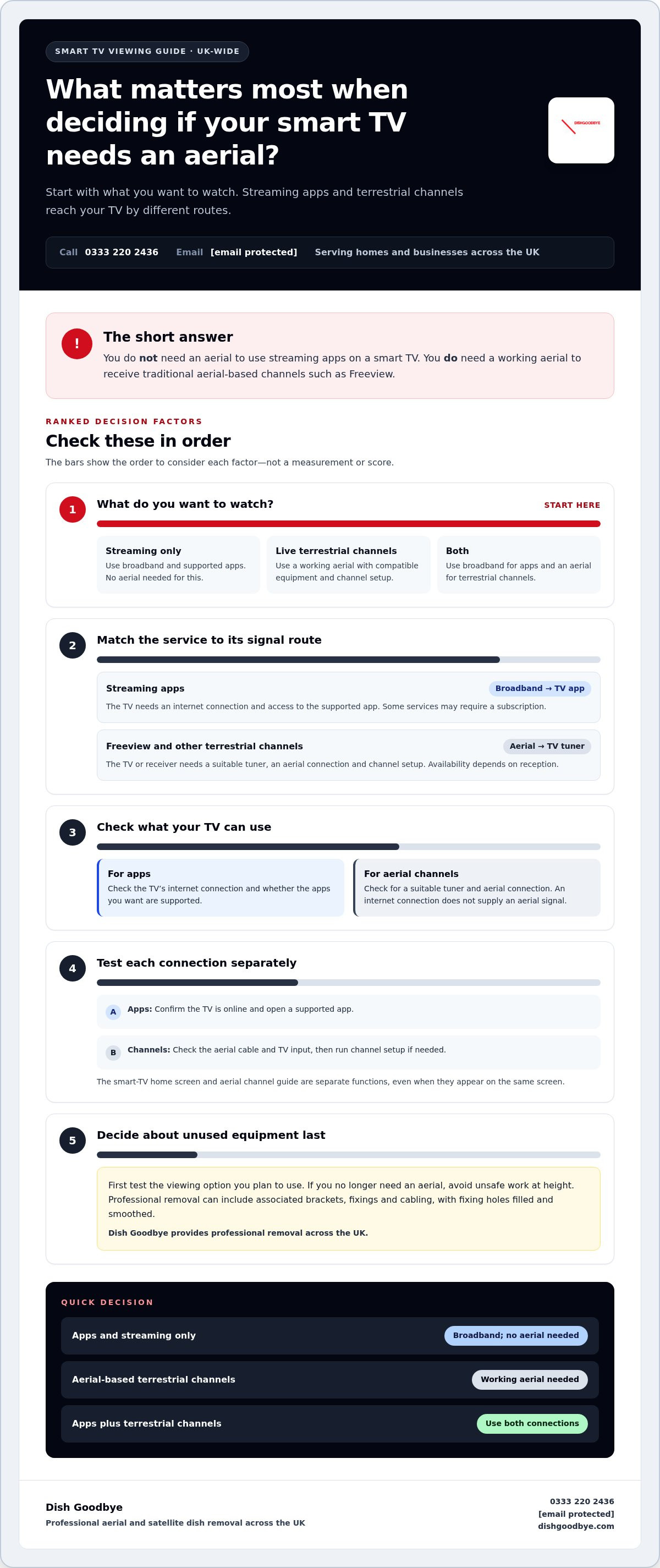
You don’t need an aerial to use streaming apps on a smart TV, but you do need one to receive traditional aerial-based channels such as Freeview. Streaming comes through your internet connection. Terrestrial television comes through an aerial connected to a compatible TV or receiver. A smart TV’s internet features don’t create an aerial signal, so your setup depends on whether you want streaming, live terrestrial channels, or both.
What does an aerial do for a television?
An aerial receives broadcast signals for compatible television equipment. The signal travels through an aerial cable to a TV tuner, which processes it so you can set up and watch available terrestrial channels. Freeview uses this type of reception. For more background on the technology, see Digital terrestrial television in the UK.
An aerial and a TV’s internet connection do different jobs. An aerial cable won’t provide internet access, and connecting the TV to broadband won’t supply an aerial signal.
What makes a television a smart TV?
A smart TV connects to the internet and runs supported apps. These may include streaming or catch-up services, but availability depends on the television and service. To watch through an app, the TV needs an internet connection and access to that app. To receive terrestrial channels through an aerial, it needs a suitable tuner and aerial connection.
Internet streaming uses broadband and supported apps; aerial-based television uses a broadcast signal received through an aerial.
Choose your setup based on what you watch:
- Streaming only: Connect the TV to broadband and use the apps available on your television. You don’t need an aerial for this.
- Live terrestrial channels: Connect a working aerial to compatible equipment and complete the channel setup.
- Both: Use the internet for apps and an aerial for terrestrial channels. You can use both connections on the same TV.
If you’re weighing up do I need an aerial for a smart tv uk, start with the programmes you want to watch, not the TV’s “smart” label. A smart TV can offer internet features without an aerial connection. If you want live Freeview reception as well as apps, you’ll need to consider both connections.
How smart-TV streaming and aerial reception work
A smart TV can receive programmes through two separate routes. One delivers content over your home internet connection; the other receives terrestrial broadcasts through an aerial cable. Knowing how each signal reaches your TV makes it easier to troubleshoot a missing app or channel and decide which connections you need.
Watching apps and internet-delivered programmes
For streaming, your router connects the television to home broadband, either wirelessly or by cable. You open a supported app, choose a programme and the service sends the video over the internet. What you can access depends on the app, TV model and service. Some services require a subscription, and an app may not carry every live channel or programme you want.
Live content delivered online still counts as live TV for licensing purposes. GOV.UK explains the rules for watching or recording live television and using BBC iPlayer in its guide to UK government's TV Licence requirements. Licensing depends on what you watch, not whether the picture arrives through broadband or an aerial.
Receiving live terrestrial television through an aerial
For terrestrial reception, the signal travels from a broadcast transmitter to an aerial, then through its cable to a television tuner. The TV, or connected equipment such as a suitable receiver, must support the relevant setup. You then use the television’s channel settings to tune in services such as Freeview, where available. This route doesn’t rely on the TV’s streaming apps.
If a channel is missing, check that the aerial cable is connected to the correct socket and that the TV is set to its television or live-channel input. You may need to run the channel setup again. The smart-TV home screen and aerial channel guide are separate functions, even when they appear on the same screen.
You can use both routes on one television. Connect it to broadband for supported apps and to an aerial for terrestrial channels, then switch between the apps and channel guide depending on what you want to watch. If one route isn’t working, test the other separately. This helps you narrow down whether the problem is with the internet connection, app or aerial reception.
Once you’ve confirmed that your chosen viewing setup works, decide whether an unused aerial is still useful. If it’s redundant, UK-wide aerial removal can include associated brackets, fixings and cabling, with fixing holes filled and smoothed.
Aerial, broadband, or satellite: which smart-TV setup suits you?
Choose your TV setup based on the programmes you want and how you prefer to receive them. Broadband streaming, terrestrial reception through an aerial and satellite reception are separate routes. A smart TV can use more than one, but internet access alone doesn’t provide an aerial signal or satellite reception.
| Viewing route | What it uses | Who it may suit |
|---|---|---|
| Aerial | An aerial cable connected to a TV or receiver with a suitable terrestrial tuner, followed by channel setup. | Viewers who want aerial-based terrestrial channels, such as Freeview where available. |
| Broadband streaming | An internet connection, a compatible smart TV and supported apps. Some services may require a subscription. | Viewers whose preferred programmes are available through the apps they can access. |
| Satellite | A satellite dish, cabling and compatible TV equipment or receiver. | Viewers who choose satellite television and have the equipment and service needed for it. |
When broadband and apps may be enough
If the programmes you watch are available through apps supported by your TV, streaming may meet your needs without a separate aerial. The TV must connect to the internet, and the relevant service must be accessible to you. App catalogues and programme access vary, so check the options on your television rather than assuming every channel is available online.
When an aerial or satellite setup may still matter
Choose an aerial connection if you want terrestrial reception through your TV’s channel guide. Satellite is a separate reception method for viewers who use satellite television. A satellite dish isn’t an aerial, and broadband doesn’t replace either type of reception equipment.
Still asking, “do I need an aerial for a smart tv uk”? If you only use compatible streaming apps, you don’t need an aerial for that viewing. If you want aerial-based channels too, you’ll need a suitable aerial setup. You can also combine broadband with aerial or satellite reception on one TV, provided the television or connected equipment supports the setup.
Test the viewing route you plan to use before deciding whether any unused equipment is redundant. For practical guidance, read this guide to TV aerial removal. If you’ve decided an existing aerial is no longer needed, UK-wide aerial removal can include associated fixings and cabling.
How to check whether your smart TV needs an aerial
Work out which connection you need before changing anything. The answer to “do I need an aerial for a smart tv uk” depends on the channels and programmes you want and how you plan to watch them. Use these checks to distinguish a simple setup issue from a reception problem.
- List what you want to watch. Note whether you mainly use streaming apps, want live terrestrial channels such as Freeview, watch satellite television, or need a combination. The viewing route determines which connections matter.
- Check the TV’s internet connection. Open the network or internet section in the television’s settings. Confirm it shows as connected, then check whether the apps you want are supported and available on the TV. App access and programmes vary by service.
- Look for the right connection. If you want terrestrial channels, check the back or side of the TV for an aerial socket, often labelled “ANT IN” or “AERIAL”. Follow the cable only as far as you can safely reach indoors. Don’t climb onto a roof or access an unsafe location to inspect external equipment.
- Check the input and channel setup. Select the TV or live-channel input rather than an HDMI input used by another device. Then open the channel settings and run the television’s channel tuning or setup process if needed. For satellite viewing, check that the connected equipment and input match that setup.
- Test each route separately. Open a supported app to test streaming, then try the channel guide for terrestrial viewing. If one works and the other doesn’t, you’ve narrowed down which connection needs attention.
What to do if channels or apps are missing
If an app won’t open, recheck the TV’s internet status and whether the app is supported. If terrestrial channels are missing, make sure the aerial cable is seated in the aerial input, select the TV input and complete channel setup. A missing channel doesn’t automatically mean the television is faulty. The cause could be the selected input, app access, connection or channel setup. If these basic checks don’t resolve it, the issue may need further diagnosis. Don’t attempt work at height to investigate an external connection.
Once your chosen viewing routes work, decide whether an unused aerial is still useful. If you’ve confirmed it’s redundant, arrange professional removal rather than dismantling equipment at height. Arrange UK-wide aerial removal for redundant equipment, including associated brackets, fixings and cabling.
What to do with an aerial you no longer need
Don’t rush to remove existing equipment just because you’ve bought a smart TV. First, make sure your preferred viewing setup works. If your apps and internet connection meet your needs and you no longer use terrestrial channels through an aerial, decide whether to keep the equipment or have it removed.
Keep, leave, or remove an unused aerial?
Base the decision on how you actually watch television. An aerial isn’t required simply because you own a smart TV, and removal isn’t a condition of using streaming apps. If you still rely on aerial-based channels, keeping the existing setup may make sense. If you’ve confirmed it’s no longer used, consider whether you want redundant equipment and cabling to remain on the property.
Never climb onto a roof or attempt work at height to inspect or dismantle an aerial. Removal may involve exterior fixings and cabling as well as the aerial itself. For broader advice about clearing redundant exterior equipment, read this guide to professional dish removal.
What professional aerial removal can include
When you’ve decided an aerial is redundant, Dish Goodbye provides professional removal across the UK. The work can include associated brackets, fixings and cabling, not just the aerial. Fixing holes are filled and smoothed to help protect the building exterior and prevent potential damp issues. Removed metal and electronic waste is processed through approved recycling centres.
This leaves the exterior tidier while ensuring leftover materials are handled responsibly. If you’re still weighing up “do I need an aerial for a smart tv uk”, test your preferred apps and channel setup first. Decide on removal only once you’re confident the equipment isn’t part of the viewing setup you want to keep.
If you’ve confirmed your aerial is no longer needed, learn more about UK-wide aerial removal. Call Dish Goodbye on 0333 220 2436 or email [email protected].
Choose the setup that fits your viewing
If you’re still asking, “do I need an aerial for a smart tv uk”, focus on what you watch. Streaming apps use broadband, while terrestrial channels need a suitable aerial connection. You can use both on one television, so there’s no need to remove equipment until you’ve tested the viewing options you want.
Check that your apps and internet connection work, and confirm your channel setup before deciding an existing aerial is redundant. Removal isn’t a requirement of owning a smart TV. It’s a choice for equipment you no longer use.
Once you’ve made that choice, Dish Goodbye provides professional aerial removal across the UK. The service can include the aerial, brackets, fixings and redundant cabling. Fixing holes are filled and smoothed, and removed metal and electronic waste is sent to approved recycling centres.
Ready to clear redundant equipment safely? Explore UK-wide professional aerial removal. Call 0333 220 2436 or email [email protected] to get started.
Frequently Asked Questions
Can I watch a smart TV without an aerial in the UK?
Yes. You can watch a smart TV without an aerial if you use internet-connected apps. Connect the television to broadband and open apps supported by your TV. Available programmes depend on each service, and some may require a subscription. If you want traditional aerial-based channels, such as Freeview, you’ll need a suitable aerial connection. So, do I need an aerial for a smart TV in the UK? Only if your chosen viewing setup requires one.
Do I need an aerial to watch Freeview on a smart TV?
For traditional Freeview reception, yes. You need an aerial connected to a compatible TV or receiver, followed by channel setup. A smart TV’s internet connection doesn’t provide this aerial signal. Some live television services may be available through apps over broadband, but these are a different viewing route and don’t mean every Freeview channel or programme is available online. Check which services your TV supports and what content they provide.
Can I watch live TV on a smart TV without an aerial?
Yes, you can watch live television without an aerial if a compatible internet service or app offers the channels you want. You’ll need an internet connection, and access may depend on the service, your TV and any subscription terms. Live television watched online can still be subject to TV licensing requirements. Check the applicable rules, especially if you use BBC iPlayer or watch live programmes through an app.
Does a smart TV need an internet connection as well as an aerial?
No, not unless you want to use both types of viewing. An aerial can provide terrestrial channels to compatible television equipment without the TV using its internet features. Broadband is needed for streaming apps and other online services. If you want apps and aerial-based channels, connect the TV to the internet and connect a suitable aerial separately. Each connection serves a different purpose, so one doesn’t replace the other.
Why is my smart TV asking me to connect an aerial?
Your TV may be asking for an aerial because you’ve selected terrestrial television or started the channel setup process. Connect an aerial only if you want to tune in aerial-based channels. If you plan to use apps instead, check that the TV is connected to the internet, select the relevant app and follow its on-screen setup. Make sure you’ve selected the correct input before assuming the TV has a fault.
Can I remove an old TV aerial myself?
Avoid dismantling an aerial yourself if the work involves a roof, ladder or any unsafe position. Aerial removal can involve brackets, fixings and cabling, so leave work at height to a professional. Dish Goodbye provides UK-wide aerial removal, including associated fixings and redundant cabling. The service also fills and smooths fixing holes and sends removed metal and electronic waste to approved recycling centres.
What happens if I leave an aerial I no longer use on my house?
Leaving an unused aerial in place is a property-maintenance choice, not a requirement of owning a smart TV. First confirm that your preferred apps or other viewing setup work, then decide whether you want to keep redundant equipment on the property. Don’t climb to inspect or remove it. For UK-wide professional removal, call Dish Goodbye on 0333 220 2436 or email [email protected].