
Dish Goodbye | dishgoodbye.com | 0333 220 2436 | [email protected]
Fibre can replace your old internet connection without changing how your television receives a signal. If you’ve searched “switched to fibre optic what to do with dish,” the key is to check whether your current TV setup still uses satellite reception.
Fibre broadband and satellite TV do different jobs. Your dish may still be needed if you receive television through a satellite service. If you’ve moved to streaming or another TV setup that doesn’t use satellite, the dish may be redundant.
This guide explains how to check, compare your options and understand what professional removal involves. Dish Goodbye removes redundant dishes, brackets, fixings and associated cabling, fills and smooths the holes left by previous installations, and sends removed metal and electronic waste to approved recycling centres.
Dish Goodbye | dishgoodbye.com | 0333 220 2436 | [email protected]
Key Takeaways
- Fibre broadband and satellite TV are separate services, so switching your internet connection doesn’t automatically make your dish redundant.
- Decide what to do with the dish by checking whether your current TV service still uses it.
- Trace visible cables and check what they connect to before deciding to keep or remove the dish.
- Professional removal can include the dish, brackets, fixings and redundant cabling, as well as filling and smoothing the exterior holes.
- Ask how removed metal and electronic waste is handled as part of leaving your property exterior tidy.
Switched to fibre optic broadband? First understand what changed
Fibre-optic broadband delivers internet access through fibre-optic cables. It changes how your home connects to the internet, but it doesn’t automatically change how your television receives a signal. Broadband and satellite TV are separate services with different equipment.
That distinction matters when deciding what to do with your dish. A new broadband connection doesn’t prove the dish is redundant. Keep it if an active service still relies on it. First identify how your household currently watches television.
Does fibre optic broadband replace satellite TV?
No. Broadband provides internet access, while a satellite dish receives signals from a satellite. Your TV may use a satellite dish, an internet connection, an aerial or another setup. Don’t assume your television service changed just because your broadband did. Check the equipment connected to your TV and identify which service you use.
What might still use the dish and its cables?
Satellite television is the main reason a household may still need a dish. Its cable may run from the dish to a receiver or other TV equipment inside. A dish can also remain on the wall after a TV service or package changes, so its presence doesn’t confirm it’s still in use.
Before treating the dish or cables as redundant, look for where they go and what equipment they connect to. A fibre connection and broadband router serve your internet connection; they don’t tell you whether your TV still depends on the dish. If you can’t identify a cable’s purpose, leave it in place until you do.
Once you’ve established that the dish is no longer needed, plan how to deal with its equipment and fixings. Dish Goodbye removes redundant dishes, brackets, fixings and associated cabling, fills and smooths the fixing holes, and sends removed metal and electronic waste to approved recycling centres. For general background on discarded electronics, see this overview of electronic waste.
What happens to your dish after switching to fibre?
Switching to fibre broadband alone doesn’t determine whether your satellite dish is still needed. Check how your current television service reaches the TV, then trace the dish’s connections as far as you safely can.
Your fibre connection and broadband router provide internet access. They’re separate from the satellite dish outside and any cable running from it into your home. Cabling can remain after a service changes, so don’t assume a wire is unused just because it looks old. What to do with the dish depends on what your TV setup still uses.
How to check whether your TV still uses the dish
Start with the equipment you use to watch television. Look at the connections between your TV and any receiver or other TV equipment, then check whether a cable from outside appears to connect to that setup. A cable’s appearance alone doesn’t prove its purpose, so don’t remove it until you understand where it goes.
- Identify the TV equipment currently in use.
- Look for a cable running from the dish to that equipment.
- If you can’t tell what a cable connects to, leave it in place until its purpose is clear.
This check helps distinguish the fibre equipment from the satellite setup. If your active TV service relies on the dish, keep it. If the setup is unclear, pause before arranging removal. Base your decision on the TV connections, not the broadband change alone.
Why an unused dish can still be worth addressing
An unused dish, brackets and trailing exterior cables can make a wall or roofline look cluttered. Removal can clear the exterior, but a complete job should also account for the fixings and holes left behind, rather than taking down the dish alone.
Once you’ve confirmed the dish is redundant, Dish Goodbye removes dishes, brackets, fixings and associated cabling, fills and smooths the fixing holes, and sends removed metal and electronic waste to approved recycling centres.
Keep, assess or remove your satellite dish: compare your options
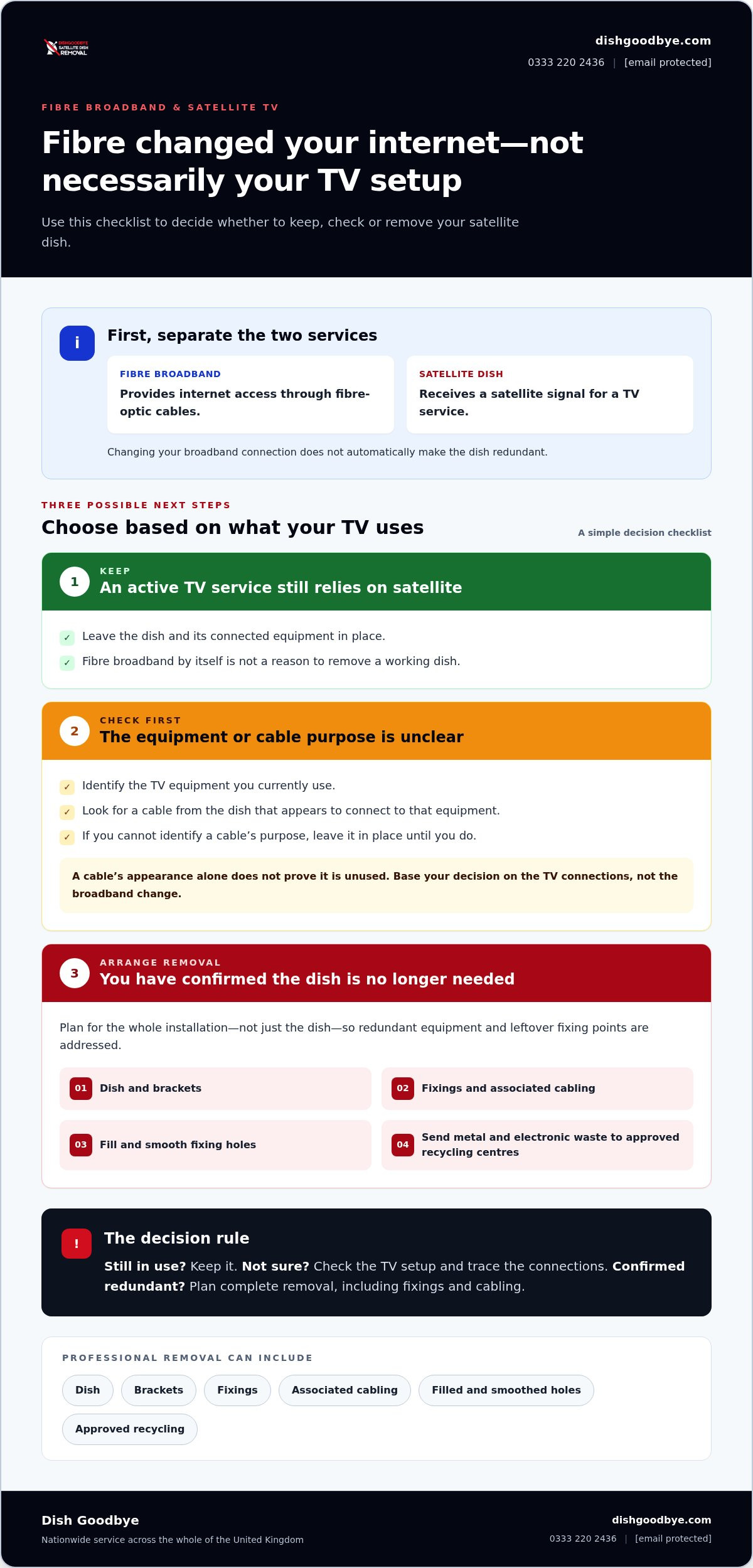
After checking what your TV equipment uses, choose the next step: keep the dish if it’s still needed, pause if its purpose is unclear, or arrange removal once you’ve confirmed it’s redundant. Use this comparison to guide your decision.
| Option | Choose it when | What to do |
|---|---|---|
| Keep | An active television service still relies on satellite reception. | Leave the dish and its connected equipment in place. Fibre broadband by itself isn’t a reason to remove it. |
| Check first | You’re unsure what a cable connects to, what equipment is in use, or how a recent service change affected your TV. | Identify the current setup before disturbing the dish, fixings or cabling. |
| Arrange removal | You’ve established that no current service needs the dish or associated cables. | Plan a complete removal, including obsolete brackets and fixings, to leave the exterior neater. |
When should you keep the dish?
Keep it while your current television setup depends on satellite reception. A broadband router and fibre connection provide internet access; they don’t show whether a separate TV service still uses the dish. If your household changes how it watches television, review the decision then. There’s no need to remove working equipment just because fibre has been installed.
When does professional dish removal make sense?
Removal makes sense once you’ve confirmed that the dish and its associated cabling are no longer needed. Taking down only the dish can leave brackets, fixings and redundant cables behind, so consider the whole installation and the exterior fixing points. A complete removal can include filling and smoothing the holes left by the fixings.
Dish Goodbye sends removed metal and electronic waste to approved recycling centres as part of its removal service. If you’ve switched to fibre optic and are deciding what to do with the dish, let its actual use guide your choice: keep it when it’s needed, pause when uncertain, and arrange removal once it’s redundant.
Before removing a dish, check its use and plan the exterior finish
Before arranging removal, check your setup. This helps you avoid disconnecting equipment that’s still in use and plan for the whole installation, not just the dish.
- Identify what’s in use. Check how the household currently watches television and whether any active equipment relies on satellite reception.
- Check the connections. Trace visible cables as far as you safely can. Don’t assume a cable is redundant just because it looks old or a service has changed.
- Decide whether the dish is redundant. If its purpose is unclear, pause until you understand what it connects to. In a shared home, check whether anyone else still uses the setup.
- Plan the removal and finish. For rented or shared properties, establish the appropriate permission before changing exterior fixtures. Consider the dish, brackets, fixings and cables together, along with the fixing holes left behind.
What should you check before arranging removal?
Make sure no current television equipment depends on the dish. Check the connections inside the property and consider whether other household members use a separate TV setup. A fibre router or broadband connection doesn’t confirm that satellite equipment is unused. If you can’t identify a cable’s destination, leave it in place until its purpose is clear.
For a rented or shared property, establish the appropriate permission before altering anything attached to the exterior. This helps ensure you have the authority to make the change.
What does a complete, tidy removal involve?
For a neat result, deal with more than the dish. Dish Goodbye’s removal service covers redundant dishes, brackets, fixings and associated cabling. Technicians fill and smooth the holes left by the fixings to help leave the exterior tidier.
Removed metal and electronic waste is sent to approved recycling centres. Once you’ve established the dish is no longer needed, arrange professional dish removal.
Ready to clear a redundant dish? See how Dish Goodbye helps
Once you’ve checked your television setup and established that the dish is no longer needed, removal can clear more than an untidy feature from your property. Dish Goodbye removes redundant satellite dishes and Sky dishes from residential and commercial properties across the UK, including associated exterior equipment.
What to expect from Dish Goodbye’s removal service
The service includes removing the dish, brackets, fixings and redundant cabling, rather than leaving old mounting hardware or loose cables behind. Technicians fill and smooth the holes left by previous installations. Removed metal and electronic waste is sent to approved recycling centres.
This complete approach can help clear a cluttered wall or roofline. The fixing holes are filled and smoothed, leaving the surrounding exterior surface visible.
Take the next step when the dish is no longer needed
You don’t have to decide based on the fibre installation alone. Check which equipment your household uses for television, and make sure the dish and its cables aren’t still serving an active setup. If you’re unsure, leave the equipment in place until you understand its purpose. Once you’ve confirmed it’s redundant, professional removal can clear the dish and its fixings together.
Explore the satellite dish removal service. If you’ve switched to fibre optic and wondered what to do with your dish, let its current use guide your decision, then arrange removal when it’s no longer needed.
Ready to clear your redundant dish? Arrange professional satellite dish removal with Dish Goodbye. Visit dishgoodbye.com, call 0333 220 2436 or email [email protected].
Make the right call for a tidier exterior
Fibre broadband and satellite TV use different equipment, so switching your internet connection doesn’t automatically make your dish redundant. Check whether your current television setup still depends on it, and don’t remove cables until you understand their purpose.
If the dish is no longer needed, Dish Goodbye’s UK-wide removal service includes the dish, brackets, fixings and redundant cabling. Fixing holes are filled and smoothed, and removed metal and electronic waste is sent to approved recycling centres.
If you’ve switched to fibre optic and are deciding what to do with your dish, let its current use guide your choice. Once you’ve confirmed it’s redundant, arrange professional removal of your redundant dish.
Visit dishgoodbye.com, call 0333 220 2436 or email [email protected] to arrange removal when you’re ready.
Frequently Asked Questions
Do I still need my satellite dish after switching to fibre optic broadband?
Only if your current television service still relies on satellite reception. Fibre broadband doesn’t automatically replace satellite TV. Check the equipment you use to watch television and whether a cable from the dish connects to it. Let the dish’s purpose, not the broadband switch, guide your choice.
Does fibre optic broadband replace satellite television?
No. Fibre optic broadband provides internet access, while a satellite dish receives signals for satellite television. TV can be delivered in different ways, so check the equipment your household actually uses. A new fibre connection or router doesn’t establish that satellite TV has stopped working or that its dish is no longer needed.
Can I leave my old satellite dish on the house?
You can leave it in place while you establish whether it’s still used. If no current TV service depends on it, you may choose professional removal to clear the exterior and deal with obsolete brackets, fixings and cabling. For rented or shared properties, establish the appropriate permission before changing exterior fixtures. If its purpose is unclear, check the connections first.
How do I know if my TV still uses the satellite dish?
Check the TV equipment you currently use and look for a cable running from the dish to a receiver or other television equipment. A cable’s appearance alone may not reveal its purpose, and old wiring can remain after a service changes. If you can’t trace the connection or identify the equipment, don’t disconnect it. Consider whether anyone else in the household uses the setup.
What happens to the holes after a satellite dish is removed?
Dish Goodbye technicians fill and smooth the holes left by the dish’s previous fixings as part of the removal service. This helps leave the exterior neater and addresses the fixing points, rather than simply taking down the dish.
Can I remove a satellite dish myself after switching to fibre?
Fibre installation doesn’t establish that the dish is redundant, so identify its use before considering removal. Taking down a dish can involve working at height and dealing with fixings attached to the exterior. Don’t cut or pull cables unless you know what they connect to. If you want the dish, brackets, fixings and redundant cabling removed together, professional removal is an option.
Dish Goodbye | dishgoodbye.com | 0333 220 2436 | [email protected]